App SDK · developer preview · not yet released

Build apps for SmileyOS.

A SmileyOS app is one Rust file implementing a small trait, plus one entry in a central registry. The OS handles launching, menus, search, file types and deeplinks for you.

This is the official SDK reference — the trait, the widget catalogue, capabilities, games, the shell, graphics and the registry. Every code sample is real source from the OS.

UI apps Games Shell commands 20+ widgets
SmileyOS desktop — the SmileyOS Terminal showing the help command, the menu bar and the app dock, all rendered by the SmileyOS kernel
Developer preview

The SDK isn't available yet — these docs are an early draft.

I'm sharing the SmileyOS App SDK documentation now to gather feedback while it's still taking shape. The SDK itself is planned to ship in 2027. Nothing here is final — names, signatures and recipes may change. If something is unclear or you'd build it differently, I'd love to hear it.

Overview00

One file, one registry entry. The OS does the rest.

Every SmileyOS app is a struct that implements AppContext and a matching AppInfo entry in the registry. You declare what your app handles — its launch command, search aliases, the file extensions it opens, the deeplink schemes it answers — and the OS routes to it. No scattered match arms anywhere in the kernel.

The big idea
your app = a struct implementing AppContext (apps/yourapp.rs)
+ one AppInfo entry in the registry (apps/registry.rs)

Three examples carry this guide

Counter (a UI app), Snake (a game) and Smilium (the kid-friendly language for shell programs). All code below is real source from the OS.

SmileyOS apps are deliberately easy to add. Adding a capability is usually a one-line change to your manifest plus, sometimes, one trait method. This page is written for contributors and for older students who have outgrown Smilium and want to build native apps in Rust.

Conventions used throughout

SmileyOS is no_std: there is no heap-backed String for UI labels — labels are 'static str, editable text uses heapless::String<N>. Every widget's draw takes the raw framebuffer: draw(&mut self, buffer: &mut [u8], stride, bytes_per_pixel, gfx). The primary build/run target is i686 (./run.sh i686) — there is no cargo test; you verify an app by booting it in QEMU and using it.
Getting started01

The AppContext trait, end to end.

An app is one Rust file implementing the AppContext trait, registered in one place. Implement the five required methods; the two capability hooks default to no-ops, so you only override what your app actually handles.

App types

TypeTraitBest forExamples
UI appAppContextWindowed tools, utilitiesCalculator, Counter, File Manager
GameAppContext + GameBaseReal-time, fullscreenSnake, Breakout
Shell commandnoneTerminal commandsls, cat, mkdir

The AppContext trait

Rust
pub trait AppContext {
fn handle_keyboard(&mut self, key: u8) -> AppAction;
// Typed non-ASCII text (e.g. Cyrillic). Default: ignore.
fn handle_text(&mut self, _cp: u32) -> AppAction { AppAction::Continue }
// Whether this app currently wants free-text input (a focused field).
fn wants_text_input(&self) -> bool { false }
fn handle_mouse(&mut self, mouse: &MouseState) -> AppAction;
fn update(&mut self) -> AppAction;
fn draw(&mut self, buffer: &mut [u8], stride: usize,
bytes_per_pixel: usize, gfx: &Graphics) -> AppAction;
fn needs_redraw(&self) -> bool;
// SDK hook: open a file's bytes (see Capabilities). Default: no-op.
fn open_file(&mut self, _filename: &str, _content: &[u8]) {}
// SDK hook: handle a deeplink (see Capabilities). Default: no-op.
fn accept_deeplink(&mut self, _scheme: &str, _arg: &str) {}
}

Required: handle_keyboard, handle_mouse, update, draw, needs_redraw. Everything else has a default — implement only what you need. Methods return AppAction:

  • AppAction::Continue — keep running
  • AppAction::Quit — close the app
  • AppAction::Minimize — send to the dock (background)

Two inherent methods the system also calls

Beyond the trait, every app provides pub fn set_needs_redraw(&mut self) (force a full redraw next frame) and pub fn cleanup(&mut self) (called when the app closes).

The lifecycle

Each frame, the main loop calls into the foreground app: handle_keyboard / handle_text / handle_mouse for input, then update(), then — if needs_redraw() is true — draw(). Apps render efficiently with dirty flags: a full repaint when self.needs_redraw is set, otherwise only the widgets whose dirty flag is set. A widget's draw() clears its own dirty flag.

A minimal app

Rust · apps/yourapp.rs
use crate::apps::framework::{AppAction, AppContext, Window};
use crate::drivers::mouse::MouseState;
use crate::graphics::graphics::Graphics;
pub struct YourApp {
window: Window,
pub needs_redraw: bool,
}
impl YourApp {
pub fn new(screen_width: usize, screen_height: usize, _initial_left_button: bool) -> Self {
// Some(w)/Some(h) = centered window; None/None = fullscreen below the menu bar.
let window = Window::new("Your App", screen_width, screen_height, Some(400), Some(300));
Self { window, needs_redraw: true }
}
pub fn set_needs_redraw(&mut self) { self.needs_redraw = true; }
pub fn cleanup(&mut self) {}
}
impl AppContext for YourApp {
fn handle_keyboard(&mut self, key: u8) -> AppAction {
// Window handles ESC = minimize, Shift+ESC = quit.
if let Some(action) = self.window.handle_keyboard(key) { return action; }
AppAction::Continue
}
fn handle_mouse(&mut self, mouse: &MouseState) -> AppAction {
if let Some(action) = self.window.handle_mouse(mouse) { return action; }
AppAction::Continue
}
fn update(&mut self) -> AppAction { AppAction::Continue }
fn draw(&mut self, buffer: &mut [u8], stride: usize,
bytes_per_pixel: usize, gfx: &Graphics) -> AppAction {
if self.needs_redraw {
self.window.draw(buffer, stride, bytes_per_pixel, gfx);
self.needs_redraw = false;
}
AppAction::Continue
}
fn needs_redraw(&self) -> bool { self.needs_redraw }
}

Window::content_rect() gives you the inner area (respecting borders + title bar) to lay out widgets in. For a full worked UI app with buttons and state, read the Counter example below.

Register it — 3 files

1. apps/yourapp.rs — your app (above). 2. apps/mod.rs — add pub mod yourapp; and pub use yourapp::*;. 3. apps/registry.rs — add the import, a define_apps! entry, and an AppInfo entry:

Rust · apps/registry.rs
// (a) define_apps! — generates the AppInstance/AppId variants + dispatch:
YourApp(YourApp) {
create: |ctx| YourApp::new(ctx.screen_width, ctx.screen_height, ctx.mouse_left_button),
commands: ["yourapp"]
},
// (b) APP_REGISTRY — the manifest (ALL fields are required):
AppInfo {
name: "Your App Name",
command: "yourapp",
alt_command: None, // or Some("alias")
app_type: AppType::Ui, // or AppType::Game
show_in_menu: true,
menu_category: MenuCategory::Main, // or System / Hidden
separator_before: false, // draw a menu separator above this item
aliases: &[], // extra command/search aliases
file_extensions: &[], // e.g. &[".foo"]
deeplink_schemes: &[], // e.g. &["foo"]
spotlight_name: None, // Some("Your App") to show in Spotlight
spotlight_rank: 0, // launcher order when shown
},

Why two places?

define_apps! builds the app instance and its dispatch (keyboard, mouse, update, draw, open_file, accept_deeplink, cleanup); APP_REGISTRY is the metadata/manifest (menus, search, capabilities). Keep the command consistent between them.

Checklist

  • App file implements AppContext (the 5 required methods)
  • Inherent new(), set_needs_redraw(), cleanup()
  • pub mod + pub use in apps/mod.rs
  • Import + define_apps! entry + APP_REGISTRY entry in registry.rs
  • Built and booted (./run.sh i686), launched from both the menu and the terminal
UI apps — Counter02

A worked example: the Counter app.

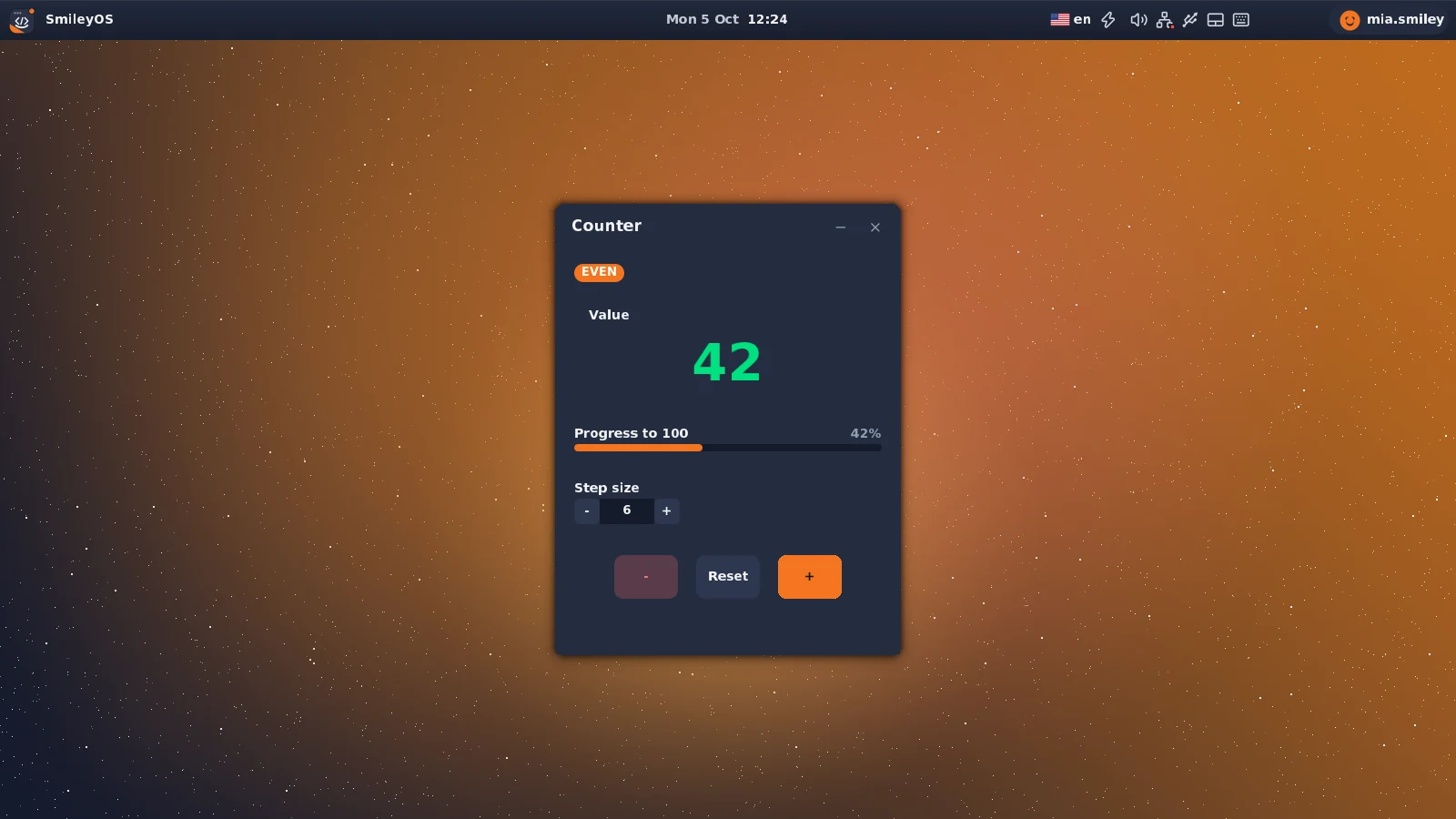
apps/counter.rs is the reference UI app. It holds its widgets in fields, constructs them once in new(), feeds them input, and redraws with dirty flags. It also demonstrates all three capability kinds (covered in the next section).

The Counter app: a 'Value' card with the large number, an EVEN/ODD badge, a 'Progress to 100' bar, a 'Step size' stepper, and the −, Reset, + buttons.

Hold widgets in fields

Rust · apps/counter.rs
pub struct Counter {
window: Window,
value: i32,
step: i32,
card: Card, // raised container for the big value
progress: ProgressBar, // value clamped to 0..100
step_stepper: Stepper, // picks the +/- step size
even_badge: Badge, // "EVEN" pill
odd_badge: Badge, // "ODD" pill
plus_button: Button,
minus_button: Button,
reset_button: Button,
last_mouse_button: bool,
pub needs_redraw: bool,
}

Construct widgets once

Rust
// In Counter::new(...) — construct the widgets once and keep them in fields.
let card = Card::new(inner_x, card_y, inner_w, card_h, "Value");
let progress = ProgressBar::new(inner_x, prog_y, inner_w, "Progress to 100", 0);
let step_stepper = Stepper::new(inner_x, step_y, "Step size", 1, 100, 1, 1);
// Two pills at the same spot; visibility toggles by parity (value 0 = even).
let even_badge = Badge::info(inner_x, badge_y, "EVEN");
let mut odd_badge = Badge::warning(inner_x, badge_y, "ODD");
odd_badge.set_visible(false);
let minus_button = Button::new(start_x, btn_y, 70, 48, "-")
.with_style(ButtonStyle::Danger);
let plus_button = Button::new(plus_x, btn_y, 70, 48, "+")
.with_style(ButtonStyle::Primary);

Funnel state changes through one method

Rust
// One place changes the value and refreshes the widgets that depend on it.
fn set_value(&mut self, value: i32) {
self.value = value;
self.progress.set_value(self.value.clamp(0, 100) as u8); // 0..=100 bar
let is_even = self.value % 2 == 0;
self.even_badge.set_visible(is_even); // EVEN / ODD pill
self.odd_badge.set_visible(!is_even);
self.needs_redraw = true;
}

Draw with dirty flags

Rust
fn draw(&mut self, buffer: &mut [u8], stride: usize,
bytes_per_pixel: usize, gfx: &Graphics) -> AppAction {
if self.needs_redraw {
self.window.draw(buffer, stride, bytes_per_pixel, gfx);
// ...clear background, draw the keyboard hints...
self.card.dirty = true; // on a full redraw, mark every widget
self.progress.dirty = true; // (Card / ProgressBar / Stepper / Badge / Buttons)
self.needs_redraw = false;
}
// Draw each widget only when dirty — draw() clears its own dirty flag.
if self.card.is_dirty() {
self.card.draw(buffer, stride, bytes_per_pixel, gfx);
self.draw_value_number(buffer, stride, bytes_per_pixel);
}
if self.progress.is_dirty() { self.progress.draw(buffer, stride, bytes_per_pixel, gfx); }
// ...badges, stepper, buttons...
AppAction::Continue
}
UI components03

A library of ready-made widgets.

SmileyOS ships widgets in kernel/src/graphics/ui/, re-exported from crate::graphics::ui. Use them to build interfaces instead of drawing controls by hand. Each has a constructor, an optional builder (.with_style(...)), a handle_mouse(...) that reports what changed, and a draw(...).

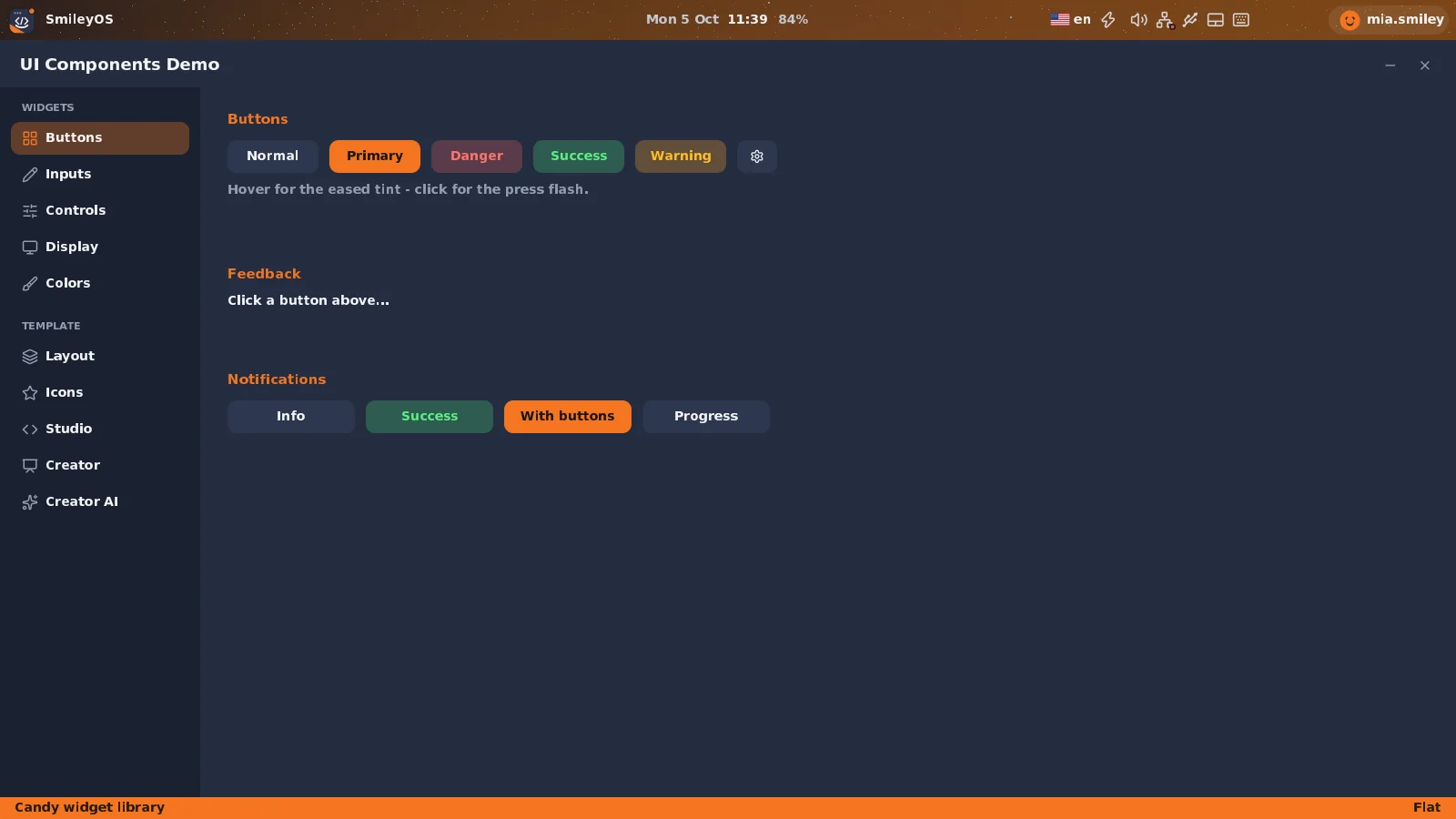
The UI Demo app (apps/uidemo.rs) showing the widget gallery: buttons, sliders, toggles, checkboxes, a tab bar, lists, a color picker, progress bars and badges.

The pattern: construct, feed input, draw

Rust
// 1. construct (store in an app field)
let mut volume = Slider::new(x, y, 200, "Volume", 0, 100, 5, 50);
// 2. input (edge-triggered click for Button; other widgets debounce internally)
let clicked = self.save_btn.handle_mouse(mouse, button_pressed);
if self.volume.handle_mouse(mouse) {
// slider value changed -> react to self.volume.value
}
// 3. draw the ones that need it (draw() clears the dirty flag)
if self.volume.is_dirty() {
self.volume.draw(buffer, stride, bytes_per_pixel, gfx);
}

Cross-cutting conventions

  • Uniform draw: draw(&mut self, buffer, stride, bytes_per_pixel, gfx). Most widgets ignore gfx; containers and pickers actually use it.
  • draw() clears dirty: always draw a widget whose dirty is true, or it can loop requesting redraws.
  • handle_mouse return: bool (changed/clicked) for Button/Slider/Stepper/Checkbox/Toggle/ColorPicker; Option<usize> (selected index) for Dropdown/TabBar/RadioGroup/List/swatch & theme pickers; a dialog-result enum for the dialogs.
  • Only Button takes an explicit button_pressed: bool — you compute the press edge. Every other widget debounces internally.
  • Const-generic N is a compile-time count: TabBar<N>, RadioGroup<N>, List<N>, ColorSwatchPicker<N> (items) and TextInput<N> / Dialog<N> (text-buffer bytes).
  • Static text: labels and item arrays are 'static str (no heap). Editable content lives in heapless::String<N>.

The full catalogue

ComponentKindPurpose
ButtoncontrolClickable push button with style variants
SlidercontrolHorizontal drag slider with numeric readout
Steppercontrol[−] value [+] numeric stepper
CheckboxcontrolLabeled checkbox
TogglecontrolLabeled on/off switch
TextInput<N>controlSingle-line editable text field
RadioGroup<N>controlVertical mutually-exclusive options
Dropdown<'a>controlFloating pop-up menu list
TabBar<N>controlHorizontal tab row
List<N>controlStatic selectable list
ColorPickercontrolRGB picker (3 sliders + preview)
ColorSwatchPicker<N>controlRow of selectable color swatches
ThemeStylePickercontrol3-up icon-theme picker
TextDisplaydisplayRead-only right-aligned value field
PanelcontainerTitled card with a divider + content area
CardcontainerTitled raised container (no divider)
DividerdisplayHorizontal/vertical separator
BadgedisplaySmall colored status pill
ProgressBarindicatorDeterminate progress bar (0–100)
SpinnerindicatorAnimated 8-dot loading spinner
Dialog<N>modalText-input dialog (Save/Open/Confirm/Alert)
OpenFileDialogmodalFile browser for opening
SaveFileDialogmodalFile browser for saving

Controls — key signatures

Button

Returns true on a fresh click (rising edge).

  • new(x, y, w, h, label)Construct a push button.
  • .with_style(ButtonStyle)Normal · Primary · Danger · Operator · Clear · Success.
  • .flat()Chromeless toolbar look.
  • handle_mouse(mouse, pressed)You pass the debounced press edge; returns true on click.

Slider / Stepper

Numeric input, clamped + stepped.

  • Slider::new(x,y,w,label,min,max,step,init)Drag slider with live readout.
  • Stepper::new(x,y,label,min,max,step,init)[−] value [+]; pass "" for no label.
  • set_value(i32)Set (clamps to range).
  • handle_mouse(mouse) -> booltrue when the value changed.

Checkbox / Toggle

Boolean controls.

  • Checkbox::new(x,y,label,checked)Auto-sized to the label.
  • Toggle::new(x,y,label,enabled)Pill track + sliding knob.
  • toggle() / set_checked / set_enabledFlip or set the state.
  • handle_mouse(mouse) -> booltrue when toggled.

TextInput<N>

Single-line field, heapless::String<N>.

  • new(x,y,w,label,placeholder)Focus, blinking cursor, ASCII + Cyrillic.
  • set_text / get_textRead or replace the contents.
  • handle_key(key) -> boolASCII/control key; no-op unless focused.
  • insert_cp(cp) / update()Unicode insert; advance cursor blink.

RadioGroup<N> / List<N>

Selection returns Option<usize>.

  • RadioGroup::new(x,y,label,opts,selected)Vertical exclusive options.
  • List::new(x,y,w,items)Static selectable list (no scroll).
  • .with_selected(i) / set_selectedPreselect / change selection.
  • handle_mouse -> Option<usize>Some(i) when a new item is chosen.

Dropdown / TabBar<N>

Pop-up menu / tab row.

  • Dropdown::new(x,y,w,items)Open it by setting open = true.
  • TabBar::new(x,y,w,tabs)Auto-sized tabs with an active indicator.
  • set_active(i)Programmatically switch tab.
  • handle_mouse -> Option<usize>Some(i) on click; gate by rect.contains for perf.

ColorPicker / ColorSwatchPicker<N>

Color selection.

  • ColorPicker::new(x,y,label,color)3 R/G/B sliders + preview; handle_mouse -> bool.
  • ColorSwatchPicker::new(...)Row of labeled swatches, single-select.
  • get_color / set_colorRead/set the chosen Color.
  • handle_mouse -> Option<usize>Some(i) on a new swatch.

ThemeStylePicker

Icon-theme picker.

  • new(x, y, initial_selected)Fixed 3-up: Classic / Tech / Minimal (clamped 0..=2).
  • set_selected(i)Set the active style.
  • handle_mouse -> Option<0|1|2>Some on change.

Display & containers

TextDisplay / Card / Panel

  • TextDisplay::new(x,y,w,h)Read-only right-aligned value (e.g. a calculator display).
  • Card::new(x,y,w,h,title)Titled raised container; "" for none.
  • Panel::new(x,y,w,h,title)Titled card with a divider bar.
  • content_rect()Inner area for placing children (Card/Panel).

Divider / Badge

  • Divider::horizontal(x,y,len)Also ::vertical; .with_thickness / .with_color / .light().
  • Badge::new(x,y,text,style)Small status pill, auto-sized.
  • Badge::info / success / warning / error / neutralConvenience constructors.
  • BadgeStyleInfo · Success · Warning · Error · Neutral.

ProgressBar / Spinner

  • ProgressBar::new(x,y,w,label,value)Value 0–100, clamped; "" hides the label row.
  • .with_style / .with_percentageDefault · Success · Warning · Error.
  • draw_animated(..., frame)Shimmer variant — pass an incrementing frame.
  • Spinner::new(x,y,label)8-dot loader; update() each frame, draw_centered(...).

Shared infrastructure

  • Rect { x, y, width, height }Layout + contains(mx,my) hit-testing.
  • UiComponentis_dirty · clear_dirty · is_visible · set_visible.
  • draw_text(buf, stride, bpp, x, y, &[u8], &Color)The canonical way to put text on screen.
  • style::accent() · surface_raised() · draw_button(...)Theme-aware design tokens (functions) + helpers.

Modal dialogs

Dialogs are driven through show/hide + handle_* + draw_modal, and expose is_active() rather than visible.

Dialog<N>

Save As / Open / Confirm / Alert.

  • Dialog::save_as(w,h) · Dialog::open(w,h)Shortcut constructors.
  • .with_file_check / .with_open_validationError on exists / missing.
  • result() -> DialogResultNone · Confirmed · Cancelled.

OpenFileDialog

Browse + open.

  • new(w,h).with_filter(".ext")Folder nav, double-click, scrolling.
  • get_selected_file / _projectRead the choice.
  • OpenFileDialogResultNone · FileSelected · ProjectSelected · Cancelled.

SaveFileDialog

Browse + save.

  • new(w,h).with_file_extension(".ext")Folder nav + filename TextInput<32>.
  • get_full_path()heapless::String<64> result path.
  • SaveFileDialogResultNone · FileSaved · Cancelled.

Want a live tour?

apps/uidemo.rs — the UI Demo app — instantiates and exercises the whole catalogue.
App capabilities04

Declare what your app handles.

Beyond drawing a window, an app can tell the OS what it handles: which file types it opens, which deeplinks it answers, what extra names launch it, and whether it appears in Spotlight. You declare these in one registry entry and (for files/deeplinks) implement one trait method. The OS does the routing — there are no match arms to edit elsewhere.

The two halves

1. The manifest — fields on your AppInfo entry (the declaration). 2. The hooks — two default-no-op methods on AppContext you override to receive the payload.

Rust · manifest fields
pub struct AppInfo {
// ...identity / menu fields...
// ---- Capability manifest ----
// Extra command/search aliases (shell recognition + Spotlight search).
pub aliases: &'static [&'static str],
// File extensions this app opens, incl. the dot, e.g. &[".smy", ".smproj"].
// Empty = claims none (the text editor is the fallback for unknown types).
pub file_extensions: &'static [&'static str],
// Deeplink schemes handled, without the ':' — &["geo"] => geo:<arg>.
pub deeplink_schemes: &'static [&'static str],
// ---- Spotlight launcher ----
// Some(name) shows the app in Spotlight with that name; None hides it.
pub spotlight_name: Option<&'static str>,
// Display order in the Spotlight launcher (lower = earlier).
pub spotlight_rank: u8,
}
Rust · the hooks (default no-ops)
// Open a file's bytes in this app. Override if you register file_extensions.
fn open_file(&mut self, _filename: &str, _content: &[u8]) {}
// Handle a deeplink aimed at this app, e.g. scheme "geo", arg "Paris".
// Override if you register deeplink_schemes.
fn accept_deeplink(&mut self, _scheme: &str, _arg: &str) {}

How routing works

  • File open — one dispatcher: app_command_for_file(name) → find-or-launch the owning app → open_file(name, bytes). File Manager and Spotlight file-icons use the same resolver, so all three agree.
  • Deeplinks — one generic <scheme>:<arg> branch: app_command_for_scheme(scheme) → launch/raise → accept_deeplink(scheme, arg).
  • Command / alias — the shell and launcher recognise app commands via is_app_commandfind_app_by_command_or_alias (checks command, alt_command, aliases).
  • Spotlight — generated from the manifest via for_each_spotlight_app (every app with spotlight_name = Some, ordered by rank).

Worked example: the Counter app

Counter is an ordinary windowed counter that also demonstrates all three capability kinds: it opens .cnt files, answers a count:<n> deeplink, and is launchable by the alias count.

Rust · apps/registry.rs
AppInfo {
name: "Counter",
command: "counter",
alt_command: Some("count"),
app_type: AppType::Ui,
show_in_menu: true,
menu_category: MenuCategory::Main,
separator_before: false,
aliases: &["count"], // searchable / typeable alias
file_extensions: &[".cnt"], // Counter opens .cnt files
deeplink_schemes: &["count"], // count:<n> deeplink
spotlight_name: None,
spotlight_rank: 0,
},
// ...and add the alias to its define_apps! entry so it's constructible by name:
Counter(Counter) {
create: |ctx| Counter::new(ctx.screen_width, ctx.screen_height, ctx.mouse_left_button),
commands: ["counter", "count"]
},
Rust · the two hooks on Counter
impl AppContext for Counter {
// ...handle_keyboard / handle_mouse / update / draw / needs_redraw...
// A .cnt file is just the saved counter value as text (e.g. "42").
fn open_file(&mut self, _filename: &str, content: &[u8]) {
if let Some(value) = core::str::from_utf8(content)
.ok()
.and_then(|s| s.trim().parse::<i32>().ok())
{
self.set_value(value);
}
}
// count:42 -> set the counter to 42
fn accept_deeplink(&mut self, _scheme: &str, arg: &str) {
if let Ok(value) = arg.trim().parse::<i32>() {
self.set_value(value);
}
}
}

That is the whole change — no edits to entry/mod.rs, spotlight.rs, the shell, or the File Manager. The manifest drives all of them.

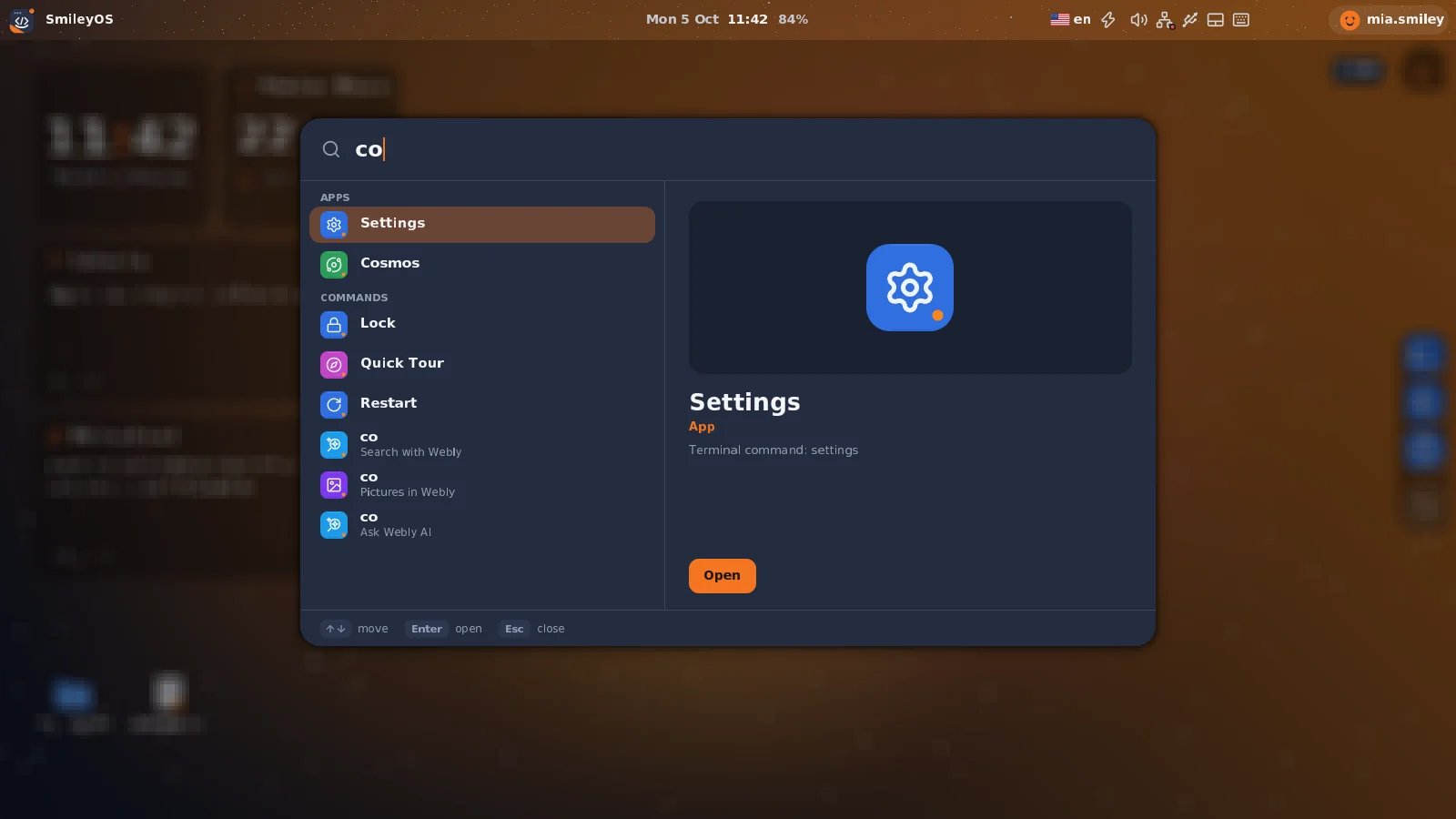
Spotlight resolving an app by name — typing 'calc' surfaces Calculator. An app's name, aliases, file types and deeplinks all come from its one-line manifest declarations; the same routing launches Counter by 'count'.

Recipes — each is a one-or-two-line change

New file type = add ".ext" to file_extensions + impl open_file. New deeplink = add the scheme + impl accept_deeplink. New search alias = add it to aliases (also add to commands: to make it launch by typing). Show/reorder in Spotlight = set spotlight_name + spotlight_rank.

Toward dynamic modules

The manifest (what an app handles) plus the two hooks (how it receives the payload) are exactly the metadata and entry points a future loadable app module would ship. Because all routing is table-driven off the registry, in-tree apps and any future external module go through identical seams.
Games05

Real-time apps on GameBase.

A game is an AppContext app that runs fullscreen, updates continuously, and uses GameBase (apps/game_framework.rs) for the things every game needs: a start menu, pause, a score/info bar, game-over handling, and frame-paced updates. Register it with app_type: AppType::Game.

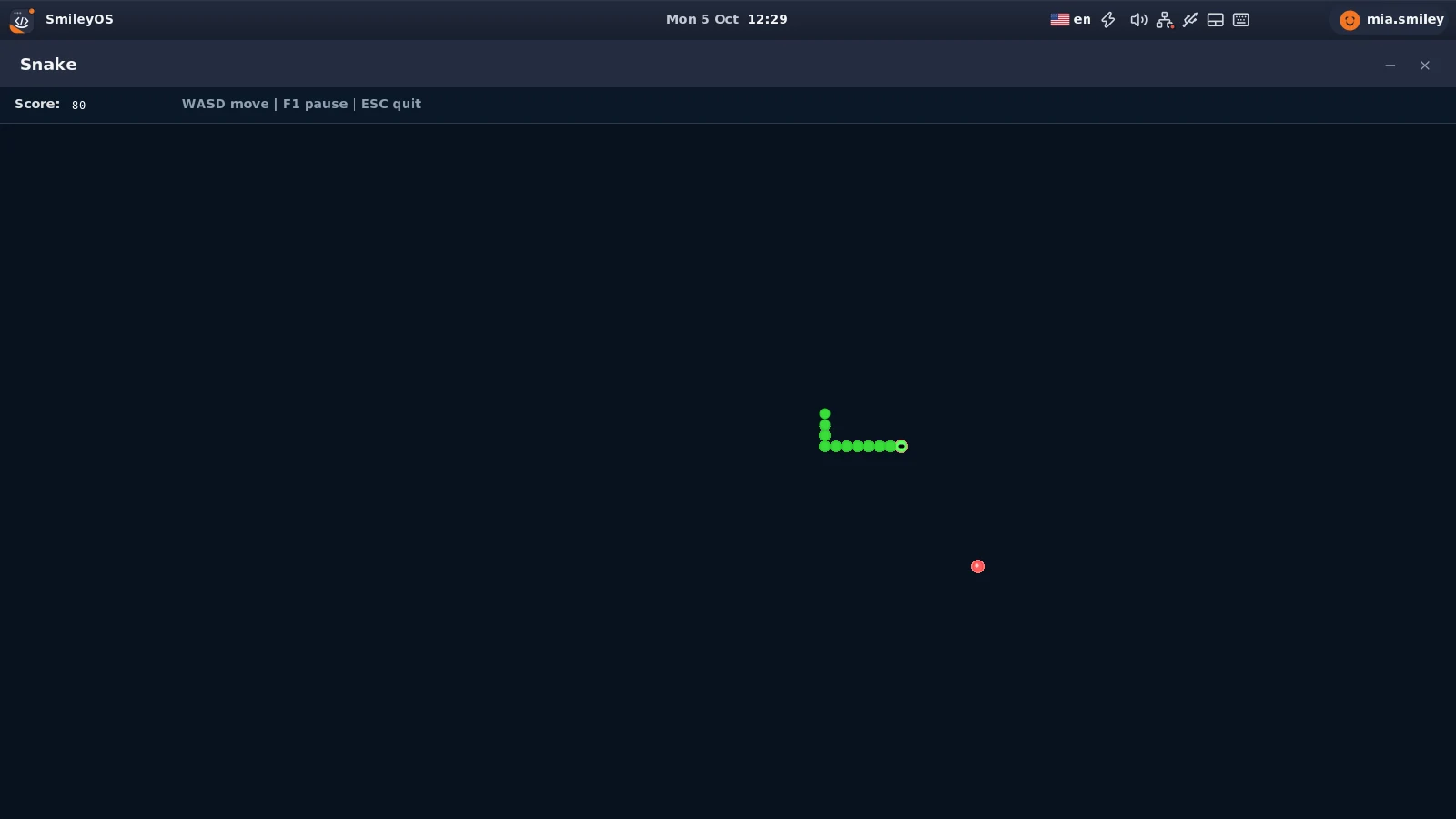
Snake: a fullscreen grid game with a score info bar on top, a green snake chasing a red food dot, and start-menu / pause / game-over overlays.

How games differ from UI apps

  • State changes in update() — the loop ticks here, frame-paced.
  • Fullscreen — create the window with None, None.
  • Continuous renderingneeds_redraw() typically returns true while playing.
  • Time-based — pace updates with GameBase::should_update(interval_ms).

A minimal game

Rust
const UPDATE_MS: u32 = 100; // 10 updates/sec
pub struct MyGame { base: GameBase, player_x: usize, player_y: usize }
impl MyGame {
pub fn new(width: usize, height: usize) -> Self {
let base = GameBase::with_controls("My Game", width, height, b"WASD - Move");
let area_h = base.game_height.saturating_sub(INFO_BAR_HEIGHT);
Self { base, player_x: base.game_width / 2, player_y: area_h / 2 }
}
pub fn set_needs_redraw(&mut self) { self.base.needs_redraw = true; }
pub fn cleanup(&mut self) {}
}
impl AppContext for MyGame {
fn update(&mut self) -> AppAction {
if !self.base.should_update(UPDATE_MS) { return AppAction::Continue; }
// ...advance game state... (only runs while playing)
AppAction::Continue
}
fn handle_keyboard(&mut self, key: u8) -> AppAction {
// F1 pause, SPACE/ENTER start, ESC minimize, Shift+ESC quit:
if let Some(action) = self.base.handle_common_input(key) { return action; }
if self.base.game_over || self.base.game_won {
if GameBase::is_restart_key(key) { self.reset(); }
return AppAction::Continue;
}
if !self.base.paused && !self.base.showing_start_menu {
match key {
b'W' | b'w' => self.player_y = self.player_y.saturating_sub(4),
b'S' | b's' => self.player_y += 4,
b'A' | b'a' => self.player_x = self.player_x.saturating_sub(4),
b'D' | b'd' => self.player_x += 4,
_ => {}
}
}
AppAction::Continue
}
fn handle_mouse(&mut self, _mouse: &MouseState) -> AppAction { AppAction::Continue }
fn needs_redraw(&self) -> bool { true }
}
GameBase reference

Construct & public fields

  • GameBase::new(title, w, h)Fullscreen window.
  • GameBase::with_controls(title, w, h, &[u8])Adds start-menu help text.
  • score · game_over · game_won · pausedRead/write game state directly.
  • game_width · game_height · first_renderContent size + one-time render flag.

Pacing & state

  • should_update(interval_ms) -> boolGate at the top of update(); false while paused/menu/over.
  • reset_game_state()Reset score, flags, menu/pause, frame timer.
  • toggle_pause / set_paused / is_pausedPause control.
  • start_game / is_showing_start_menuStart-menu control.

Input

  • handle_common_input(key) -> Option<AppAction>F1 pause, SPACE/ENTER start, ESC minimize, Shift+ESC quit. Call first.
  • is_restart_key(key) -> boolR — restart.
  • is_start_key(key) -> boolSPACE/ENTER.

Rendering helpers

  • draw_background / clear_areaBoard background + cell clears.
  • draw_info_bar / draw_scoreTop info bar + score.
  • draw_start_menu / draw_pause_overlay / draw_game_over_overlayDrawn once per state change via overlay_drawn.
  • INFO_BAR_HEIGHT = 40Offset game elements below the info bar.

Incremental rendering

Rust
fn render(&mut self, buffer: &mut [u8], stride: usize, bpp: usize, gfx: &Graphics) {
let c = self.base.window.content_rect();
let area_y = c.y + INFO_BAR_HEIGHT;
if self.base.first_render {
self.base.window.draw(buffer, stride, bpp, gfx);
self.base.draw_background(gfx, buffer, stride, c.x, c.y, c.width, c.height);
self.base.draw_info_bar(gfx, buffer, stride, bpp, c.x, c.y, c.width,
b"WASD | F1 pause | ESC quit");
self.base.first_render = false;
self.base.overlay_drawn = false;
}
if self.base.showing_start_menu { self.base.draw_start_menu(/* ... */); return; }
if self.base.paused { self.base.draw_pause_overlay(/* ... */); return; }
// ...clear the old player cell, draw the new one...
gfx.fill_rect(buffer, stride, c.x + self.player_x, area_y + self.player_y,
16, 16, &Color::GREEN);
if self.base.game_over { self.base.draw_game_over_overlay(/* "GAME OVER!" */); }
}

Best practices

Gate update() with should_update(interval_ms) for consistent speed. Offset elements by INFO_BAR_HEIGHT. Skip game logic while paused / on the start menu. Let the overlay helpers draw once (they use overlay_drawn) — repainting a full-screen overlay every frame tanks the frame rate. Provide a restart path on game-over via is_restart_key + reset_game_state. Working examples: apps/snake.rs and apps/breakout.rs.
Shell commands06

Built-in terminal commands.

The terminal has a fixed set of built-ins (ls, cat, mkdir, echo, theme, …). Before adding one, note there are usually better extension points — add a true built-in only for an OS-level operation that isn't an app.

Usually you don't touch the shell

Launching an app? Any registered app command is recognised automatically — declaring your app makes it runnable from the terminal for free, including its aliases. A kid-facing program? Write it in Smilium, the in-OS language — that's the intended path for user programs, not kernel shell built-ins.

How the shell dispatches

Parsing lives in shell/shell.rs::handle_command, which splits the line and returns a CommandResult describing what to do — it does not execute or print anything itself.

Rust · shell/shell.rs
pub fn handle_command<'a>(&self, command: &'a str) -> CommandResult<'a> {
let parts: [&str; 10] = /* split on whitespace, up to 10 tokens */;
if parts[0].is_empty() { return CommandResult::Empty; }
// App commands win first — registry-driven, no per-app code here.
if registry::is_app_command(parts[0]) {
return CommandResult::LaunchApp(parts[0]);
}
match parts[0] {
"help" => CommandResult::Help,
"clear" => CommandResult::Clear,
"echo" => CommandResult::Echo(command.strip_prefix("echo").unwrap_or("").trim()),
"ls" => CommandResult::Ls,
"cat" => CommandResult::Cat(parts[1]),
// ...~40 more...
_ => CommandResult::Unknown(parts[0]),
}
}

The returned CommandResult is then executed by the terminal's command processor, which renders the output lines. So a built-in has three parts:

  • A variant on the CommandResult enum (carrying any parsed args).
  • A parse arm in handle_command — e.g. "mycmd" => CommandResult::MyCmd(parts[1]).
  • An execution handler where CommandResult is consumed (it produces the output) — follow Echo / Ls.

Conventions

Validate args and print a short usage line when they're missing (see cat / write). Keep one command to one purpose. Use the same filesystem/process accessors the existing commands use (follow ls, ps). Remember the cap: handle_command keeps only the first 10 whitespace tokens.

Smilium — the kid-facing path

User programs are written in Smilium, the built-in language. It reads like a tiny, strictly-typed C/JavaScript: braces and semicolons, // comments, and @-directives at the top of every file.

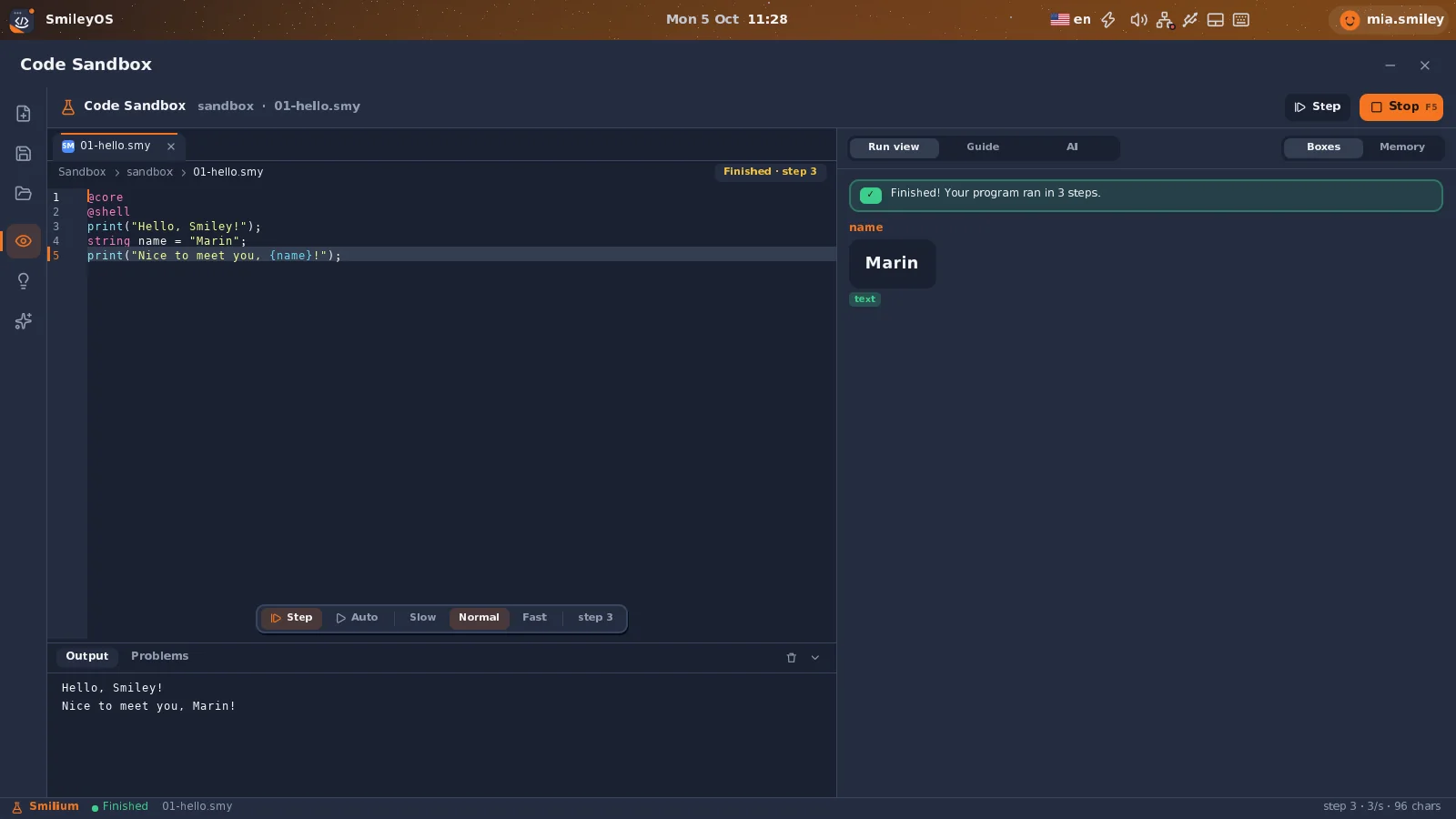
A Smilium @shell program: the source and its printed output ('Hello, World!' etc.) — the intended path for kid-facing user programs.
Smilium · hello world & directives
@core
@shell
// Comments start with // · every shell program opens with directives:
// @core = variables, conditions, loops, functions
// @shell = text in/out (add @system for rand/sleep/dates/files)
outLine("Hello, World!");
outLine("Welcome to Smilium!");
Smilium · variables & types
// Three types: number, string, boolean.
number age;
age = 25;
string name;
name = "Alice";
boolean happy;
happy = true;
number myAge = 10; // declare + init on one line
Smilium · conditions
if(score >= 90){
outLine("Grade: A - Excellent!");
}
else if(score >= 80){
outLine("Grade: B - Good job!");
}
else{
outLine("Grade: F - Try again");
}
Smilium · loops
// while
number i;
i = 1;
while(i <= 5){
outLine(i);
i = i + 1;
}
// for(init; cond; step)
for(i = 1; i <= 5; i = i + 1){
outLine(i);
}
Smilium · functions
// Values come back through the result variable.
func add(number a, number b){
number sum;
sum = a + b;
return sum;
}
add(5, 3);
outLine(result); // prints 8

Smilium built-ins

@shell: out, outLine, in. @core: number, string, boolean, if, else, while, for, func, return, true, false, plus math (sqrt, pow, abs, floor, ceil, min, max, sin, cos, tan, len, toNum, toStr). @system (add to header): rand, sleep, date functions, readFile, writeFile, fileExists.
Graphics & theme07

Custom drawing that follows the theme.

Most apps lay out widgets and never touch raw pixels. When you do need custom drawing — a game board, a chart, a custom widget — use the Graphics helper and the text/icon functions, and pull colors from the active theme so your app matches the rest of the OS.

SmileyOS Paint — a graphical app built on the same Graphics primitives and theme tokens documented in this section.

Drawing primitives — Graphics

gfx: &Graphics comes into every draw(). Note: the rect/pixel calls take stride but not bytes_per_pixel.

Rust
gfx.fill_rect(buffer, stride, x, y, width, height, &color);
gfx.draw_rect(buffer, stride, x, y, width, height, &color); // 1px outline
gfx.fill_circle(buffer, stride, center_x, center_y, radius, &color);
gfx.draw_pixel(buffer, stride, x, y, &color);
// Color is crate::graphics::color::Color:
let c = Color::new(r, g, b); // plus consts like Color::WHITE, Color::GREEN

Text

Rust
use crate::graphics::text::{draw_text, draw_char_scaled};
// A text run (8px font). text is &[u8] — use a byte string b"...".
draw_text(buffer, stride, bytes_per_pixel, x, y, b"Hello", &Color::WHITE);
// One character scaled up (e.g. a big counter readout at 5x):
draw_char_scaled(buffer, stride, bytes_per_pixel, x, y, b'7', &Color::GREEN, 5);

Icons & the sprite cache

Icon drawing is automatically cached — the first draw renders pixel-by-pixel and caches the result; later draws blit from the cache. 32×32 color icons live in crate::graphics::icons32 (toolbar buttons via draw_icon_btn); 12×12 bitmap icons in crate::graphics::icons. A set of common icons is pre-cached at boot.

Theme

Rust
use crate::graphics::theme::get_theme;
let theme = get_theme(); // &'static ThemeColors
let bg = theme.bg_primary;
let panel = theme.bg_secondary;
let text = theme.text_primary;
let dim = theme.text_secondary;
let accent = theme.accent;
let border = theme.window_border;

The theme has two independent axes the user controls in Settings:

  • Accent / color scheme (Dark, Light, Blue, Purple, Green) — drives the ThemeColors above.
  • Icon theme style (Classic, Tech, Minimal) — get_current_theme_style(); also pickable via the ThemeStylePicker widget.

Tips

Prefer widgets and style/theme colors over hardcoded Color::new(...) so your app re-themes for free. Respect dirty-flag rendering — repaint only what changed. Use Window::content_rect() to position everything inside the window borders. The style tokens are functions, so they track the active theme automatically.
Reference08

Registry, helpers, and troubleshooting.

Every app is one AppInfo entry in APP_REGISTRY (apps/registry.rs). All fields are required.

AppInfo — every field

FieldTypeMeaning
name'static strDisplay name (menu bar, dock).
command'static strPrimary launch command (terminal + internal).
alt_commandOption<'static str>One legacy alternate command. Superseded by aliases.
app_typeAppTypeUi | Game | Shell.
show_in_menuboolShow in the menu it belongs to.
menu_categoryMenuCategoryMain (smiley menu) | System (clock menu) | Hidden.
separator_beforeboolDraw a menu separator above this item.
aliases&['static str]Extra command/search aliases (shell + Spotlight).
file_extensions&['static str]Extensions this app opens, incl. the dot. Empty ⇒ editor fallback.
deeplink_schemes&['static str]Deeplink schemes handled (no colon).
spotlight_nameOption<'static str>Some(name) shows it in Spotlight; None hides it.
spotlight_ranku8Launcher order when shown (lower = earlier).

Lookup helpers (apps/registry.rs)

HelperReturns
find_app_by_command(cmd)match on command / alt_command
find_app_by_command_or_alias(cmd)+ aliases (backs is_app_command)
is_app_command(cmd) → boolis this word an app launch command? (shell uses it)
get_all_app_commands()every command + alt_command (shell autocomplete)
app_command_for_file(filename)extension → owning app’s command (None ⇒ editor)
app_command_for_scheme(scheme)deeplink scheme → owning app’s command
for_each_spotlight_app(f)launcher entries (name, command, aliases) in rank order

The launch path

Menu clicks and typed commands go through the same code, so behaviour is identical.

Flow
menu click / terminal command
|
v
registry::is_app_command(word) // is it an app?
| yes
v
mode_transitions::launch_app_by_command(...)
|
v
AppInstance::from_command(cmd, ctx) // built by the define_apps! macro
|
v
ModeManager launches it; the main loop then
dispatches handle_keyboard / handle_mouse / update / draw to your app

Special apps: Editor & Smilium

These need extra constructor parameters, so they bypass the standard create: closure and use dedicated factories: AppInstance::create_editor(filename, ctx), create_smilium(script, filename), create_smilium_ui(...), create_smilium_game(...). Most apps just use define_apps!.

Troubleshooting

Build & registration

  • Won't compileMost often a missing AppInfo field (all 12 required); confirm command matches between define_apps! and APP_REGISTRY, and mod.rs has pub mod + pub use.
  • Menu vs terminalLaunches from terminal but not the menu? Set show_in_menu: true and a menu_category.
  • Alias not launchingRecognised in search but typing it does nothing? Add it to the define_apps! commands: list too.

Runtime

  • Never renders / freezesneeds_redraw() must return true when there’s something to draw, and draw() must clear the flag. A permanently-dirty widget that’s never drawn loops.
  • Clicks do nothingUse edge detection: mouse.left_button && !last. Check window.handle_mouse first; Button takes the press edge.
  • Game too fast / lagsPace update() with should_update(interval_ms); draw overlays via GameBase helpers (overlay_drawn), not every frame.

Verifying

There is no cargo test for the kernel — build and boot it (./run.sh i686) and exercise the app in QEMU. Launch it from both the menu and the terminal.
Thanks for reading the draft

Tell me what would make this clearer.

This SDK is being designed in the open. If a section confused you, a signature looks wrong, or you wish an example existed — that feedback directly shapes what ships in 2027.