Personal story · SmileyOS 1.0
SmileyOS 1.0: an offline educational operating system for learning to code and bringing old computers back to life
How curiosity about AI coding tools turned, in one month and about 50,000 lines of Rust, into SmileyOS 1.0 — an offline operating system for learning to code, and the first version that ran on a real laptop.
By Nikola Gjorgiev · · 6 min read · 1 view
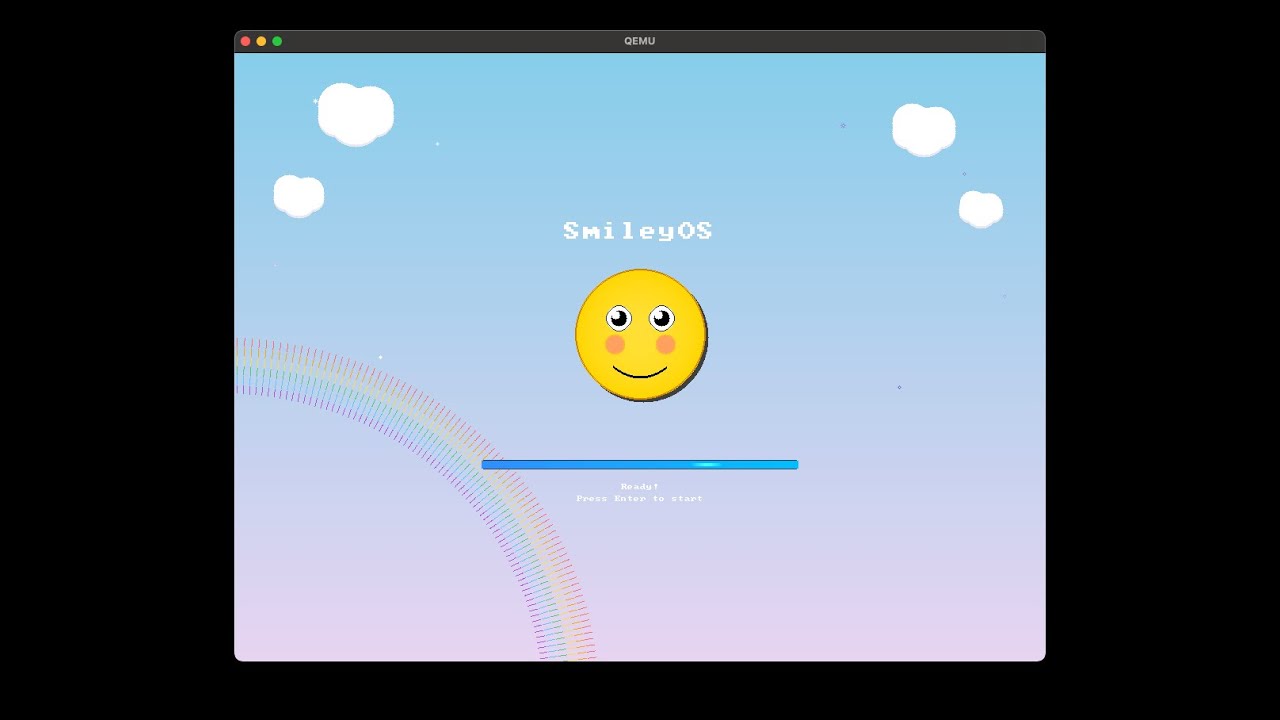
I first published this text on LinkedIn (in Macedonian) on 2 December 2025. SmileyOS 1.0 was the first version that ran on real hardware — an old Dell Inspiron 910.
Over the last month, alongside my job and everything else, I quietly started working on a project born out of pure curiosity and one question:
“Are AI coding tools powerful enough to help build an entire bare-metal operating system in a week?”
The answer, one month and about 50,000 lines of Rust later, is called SmileyOS v1.0. 😊
What is SmileyOS?
SmileyOS 1.0 is an 🖥️ offline educational operating system, designed for kids, beginners and curious teenagers, and meant to run on the old laptops and desktops that usually gather dust somewhere at home.
Instead of that old computer ending up as scrap, the idea is for it to become 👉 a safe, focused place to learn programming — no internet, no ads and no notifications.
How did the idea start?
For a long time I wanted to see:
- how far a project can be pushed when your main copilot is AI,
- and how far you can go with a vibe coding approach: idea → description → AI → code → iterations.
I started with small steps: a bootloader, a text terminal, a Snake game… and step by step the project grew into a whole bare-metal OS in Rust, with its own graphics system, its own file system and a small ecosystem around it.
At first I did not imagine it as an operating system for kids at all. It started as a pure technical experiment: “let’s see how far you can get with Rust + AI tools and a bare-metal OS”.
By version 0.8 I already had a kernel, graphics, a few games and system tools — and that is when it “clicked” that this could become an offline educational operating system for kids and teenagers, instead of just another side project for developers. From that moment my whole focus changed: it had to be easy to understand, safe, kid-friendly, and genuinely usable for learning to code on old hardware that would otherwise gather dust.
What is inside SmileyOS 1.0?
In version 1.0 SmileyOS is no longer just an “engineering experiment”, but something that can really be used for learning. A few things from the inside:
🧠 Smilium – a programming language for kids
I made my own simple language, Smilium, designed to look approachable to a beginner while introducing real concepts: variables, conditions, loops, functions and even simple games.
@core
@shell
@system

number target;
number guess;
number attempts;
boolean won;

outLine("=====================");
outLine(" NUMBER GUESS GAME  ");
outLine("=====================");

rand(target, 1, 50);
attempts = 0;
won = false;

outLine("Guess 1-50");
outLine("You have 7 tries!");
outLine("");

while(won == false){
    if(attempts >= 7){
        outLine("Game Over!");
        out("Number was: ");
        outLine(target);
        won = true;
    }
    else{
        outLine("Your guess:");
        in(guess);
        attempts = attempts + 1;

        if(guess == target){
            outLine("");
            outLine("CORRECT!");
            won = true;
        }
        else if(guess < target){
            outLine("Higher!");
        }
        else{
            outLine("Lower!");
        }
    }
}
Smilium has two modes:
- Shell Mode – text programs (quizzes, calculators, number-guessing games…)
- Game Mode – a simple 2D world of 160×120 pixels, 16 colours, sprites and controls.
@core
@game
@system

number px = 65;
number py = 100;
number pw = 30;

number bx = 80;
number by = 20;
number bsize = 8;
number bdy = 2;
number score = 0;
number lives = 3;
boolean gameOver = false;

func update() {
    if (gameOver) {
        clearScreen(2);
        drawText("GAME OVER!", 40, 40, 1, 1);
        drawText("Score:", 48, 58, 1, 1);
        drawText(toStr(score, 0), 98, 58, 5, 1);
        return;
    }

    clearScreen(4);

    if (keyDown("left")) {
        px = px - 6;
    }
    if (keyDown("right")) {
        px = px + 6;
    }

    if (px < 0) {
        px = 0;
    }
    if (px > screenWidth - pw) {
        px = screenWidth - pw;
    }

    by = by + bdy;

    if (by > screenHeight) {
        lives = lives - 1;
        by = 20;
        rand(bx, 10, 142);
        if (lives <= 0) {
            gameOver = true;
        }
    }

    if (by > py - bsize) {
        if (bx > px - bsize) {
            if (bx < px + pw) {
                score = score + 1;
                by = 20;
                rand(bx, 10, 142);
            }
        }
    }

    fillRect(0, 0, screenWidth, 14, 14);
    drawText("Score:", 5, 3, 1, 1);
    drawText(toStr(score, 0), 53, 3, 5, 1);
    drawText("Lives:", 85, 3, 1, 1);
    drawText(toStr(lives, 0), 135, 3, 2, 1);

    fillRect(px, py, pw, 6, 2);
    fillRect(bx, by, bsize, bsize, 5);
}
✏️ A built-in IDE with lessons
SmileyOS comes with a built-in Smilium IDE, where kids can:
- write code with syntax highlighting,
- see their program running live,
- and follow structured lessons – step by step, from “Hello World” to a complete mini game.
🎮 Games and creative tools
So that it is not only “dry” programming, there is also:
- classic games (Snake, Breakout, Type Attack for keyboard practice and more),
- a simple Paint app,
- a text editor and a small file manager,
- and of course a real terminal with basic commands.
All of it works completely offline.
Why offline, and why old hardware?
I honestly believe that:
- kids need a focused digital environment – without algorithms that pull at their attention,
- old hardware can become the best classroom for programming, instead of ending up in a landfill.
SmileyOS is an attempt to turn an old laptop into a “coding playground” for kids, and to create a space where the computer is a tool, not just a machine for endless scrolling.
Technical details for the curious
For those interested in what is “under the hood”:
- SmileyOS is a bare-metal OS: not a Linux distro, with no Windows or Ubuntu underneath.
- It is written entirely in Rust, with its own kernel, graphics layer and file system.
- It supports multitasking (several apps at the same time).
- It currently targets x86_64, and Raspberry Pi / RISC-V support is in my plans.
This is my small attempt to show what can be done when you combine curiosity, enthusiasm, AI tools and an old laptop nobody uses. 🙂
One honest question
If I continue this story, would it be worth 2,000–3,000 denars (about €30–50) to you to invest in your kids’ future – and get in return a complete physical learning pack that would include:
- 🟡 SmileyOS on a USB stick, ready for an old laptop or desktop
- 📚 real printed books, not PDFs – guides to the Terminal/Shell
- 🧩 a printed step-by-step introduction to programming
- 🎮 and one more book on advanced game programming in the same environment
I am genuinely curious – would you buy a pack like this for your kids, grandkids or students?