The Smilium language.
A programming language simple enough for a kid's first line of code — and powerful enough to keep up with them. Born inside SmileyOS, Smilium has the features modern languages have — structs with methods, enums, maps, pattern matching, reactivity, persistence, named arguments — spelled in plain words, with errors that teach instead of scold.
This page is the official reference: every feature explained, with examples from first-step to advanced. Hit ▶ Try on any snippet — it opens in a playground tab and runs right in your browser, on the real interpreter.
@core@shell struct Player { string name; number score;} [persist]number best = 0; // remembered across runs string name = ask("What is your name? ");need(not name.empty, "A hero needs a name!"); Player p = { name: name, score: name.length * 3 };print("Hi {p.name}, you scored {p.score}!", Colors.green); if(p.score over best or best is 0) { best = p.score; print("NEW BEST: {best}", Colors.yellow);}Try Smilium right here.
The REAL interpreter — the same kernel source that runs inside SmileyOS, compiled to WebAssembly. Press Run (or F5), answer ask() prompts, and event programs stay live. The + tab creates extra .smy / .json files that load() can read — and every file your program save()s opens as a tab.
@core
@shell
@system

print("Welcome to Smilium!", Colors.yellow);

string name = ask("What is your name? ");
print("Hi {name}!", Colors.green);

// a list, a loop and some luck
number[] rolls = [];
repeat(3) {
    rolls.add(random(1, 6));
}
print("Your dice: {rolls}  (sum {rolls.sum()})");

// watch a value - the block runs on every change
number score = 0;
score.watch(old, new) {
    print("score: {old} -> {new}", Colors.magenta);
}
score = rolls.sum() * 10;

save("best", score);   // remembered - opens a save.json tab!

// match the result - first true case wins
when(score) {
    (over 100)   { print("CHAMPION!", Colors.green); }
    (50 to 100)  { print("Nice roll!", Colors.cyan); }
    ()           { print("Try again!"); }
}Press Run (or F5 in the editor) — output appears here. Files your program saves open as tabs; the + tab creates .smy / .json files that load() can read.
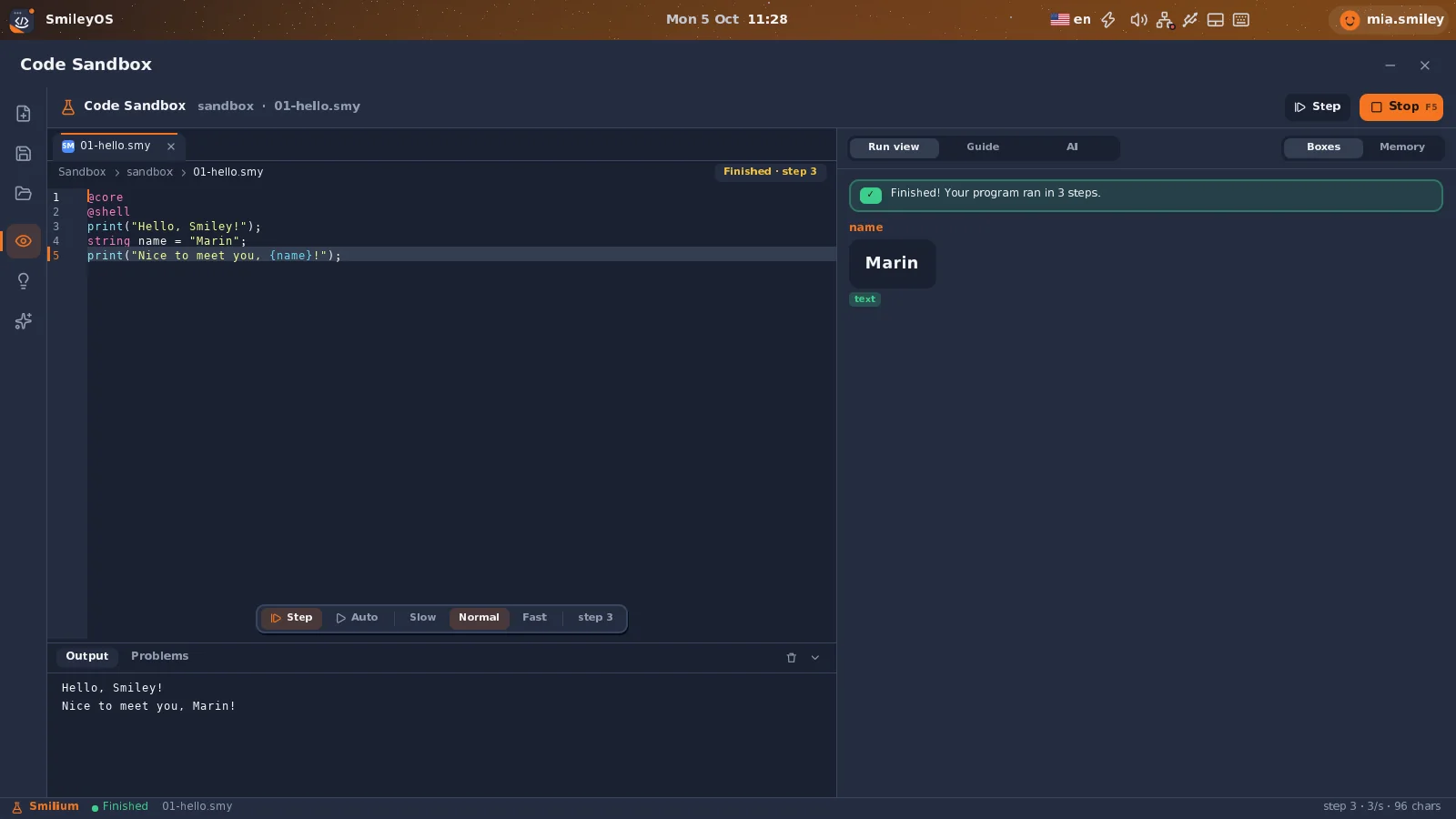
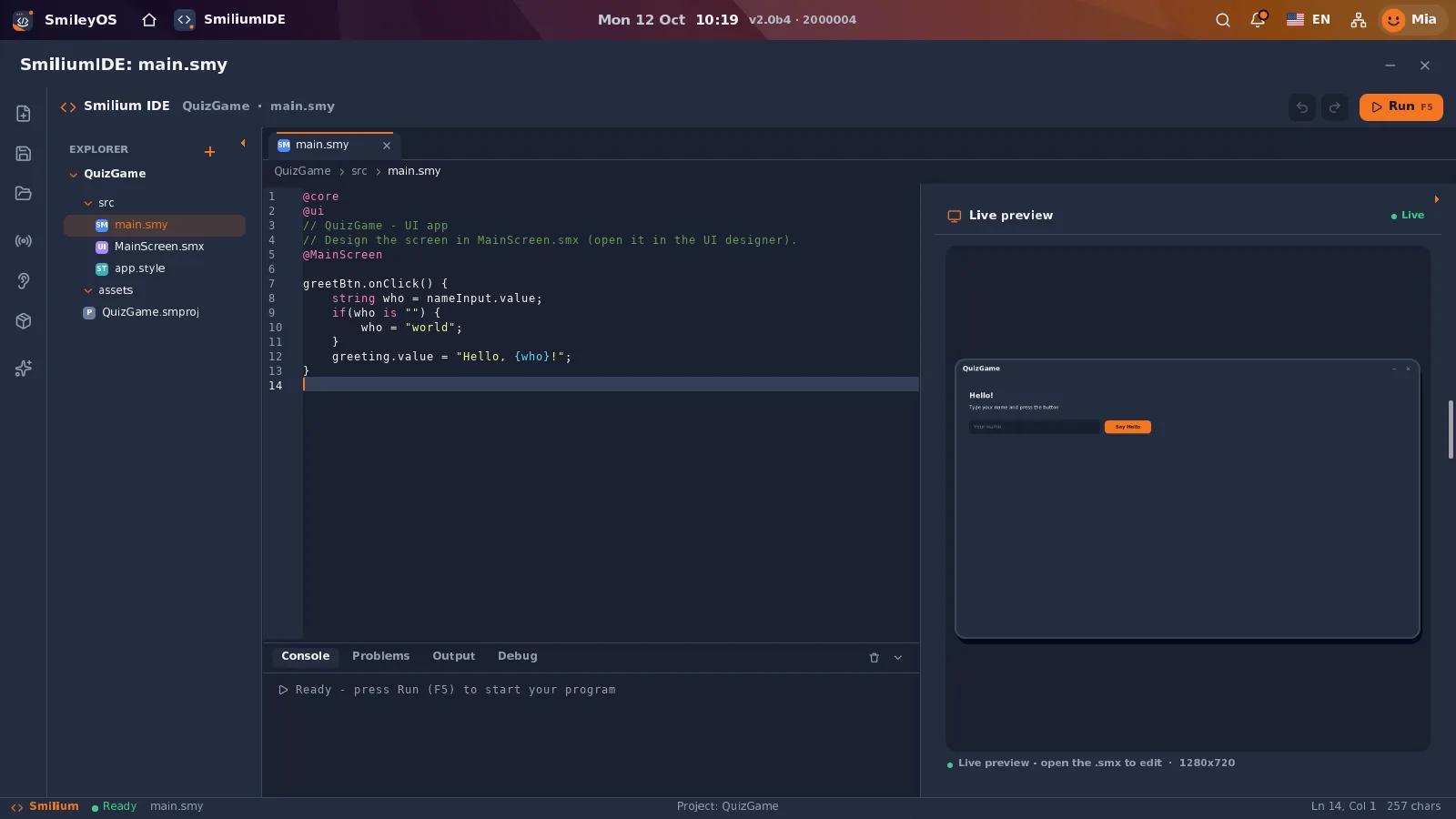
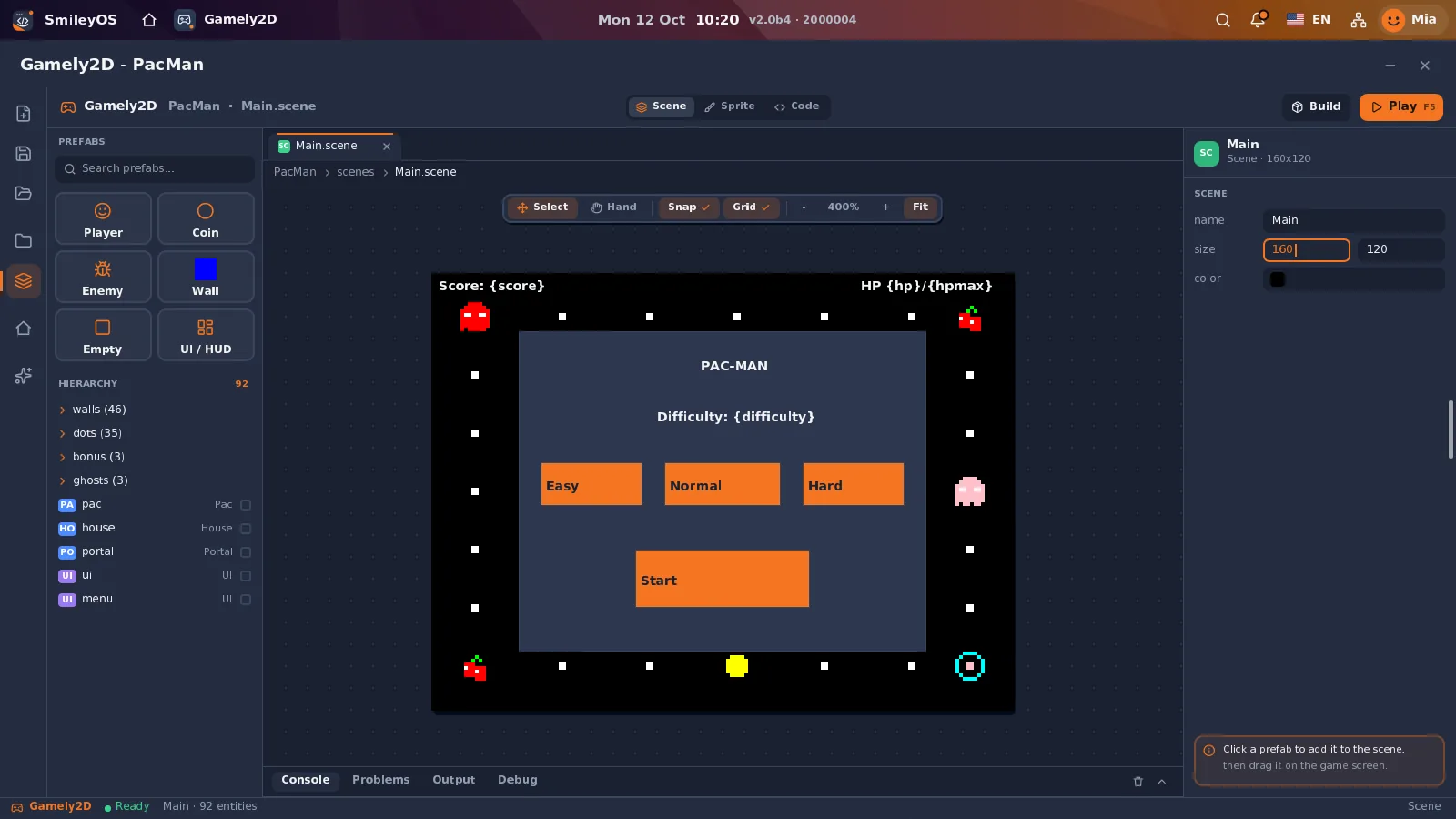
Where Smilium lives inside SmileyOS.
Real screenshots of the current system. Click a picture to open it full size.
The whole language fits in your head.
This is ALL of Smilium — every word it knows, on one card. Single English words, each with one job. Hover a word to see what it does and how it looks in code, then dive into the sections below.
Directives4
Keywords21
Word operators8
Types5
Attributes5
Builtins13
Value methods10
Namespaces3
Keywords
Match ONE value against cases — first true case wins, no fall-through, empty () catches the rest. Over an enum it checks you covered every value.
when(score) { (over 90) { print("A"); } (80 to 89) { print("B"); } () { print("ok"); }}Hover any word — or tap on touch screens. The deep dives with runnable examples start right below. ↓
Directives, types and null.
A program starts with directives: @core is always on, @shell makes it a text program, @system unlocks helpers like random(). Three simple types — and one honest rule: a variable you never set is null (“no value yet”), not a sneaky zero.
@core@shell number score = 42; // whole or decimalstring name = "Marija"; // textboolean happy = true; // yes / no // {curly} interpolation inside strings:print("{name} scored {score}!");print("double: {score * 2}");Six directives exist: @core, @shell, @system and @date work everywhere (including this page's playground) — while @ui (windows, buttons, inputs) and @game (sprites for Gamely2D) need the real SmileyOS.
Ask a question, get a typed answer.
ask() shows the question and waits. The declared type of the target decides how the answer is read — ask into a number and a non-number answer gets a friendly “try again”. It fills ANY target — fields, elements, whole structs — and can offer a fixed list of choices.
@core@shell string name = ask("Your name? ");number age = ask("How old are you? "); // re-asks until it's a number print("Hi {name}!");print("Next year you will be {age + 1}.");Words, loops and when.
Smilium has TWO equal spellings for logic. Kids meet the word style first (is, isnt, over, under, and, or, not); the symbols (==, !=, >, <, &&, ||) are what every other language uses — so graduating to Python or JS feels familiar. And when matches one value against cases, with no fall-through.
@core@shell number score = 87; if(score over 50 and score isnt 100) { print("Nice score!", Colors.green);}else { print("Keep trying!");} // words and symbols are BOTH fine:if(score >= 80 || score == 42) { print("Top tier");}Arrays, transforms and maps.
Arrays grow as you go and answer real questions — .sum(), .max(), .contains(), .pick(). The transform family (.map / .where / .count / .all / .any) makes new lists without loops — and MAPS hold values by string key, like a phone book.
@core@shell@system number[] scores = [10, 25, 3];scores.add(40); print(scores);print("count: {scores.length}, sum: {scores.sum()}");print("best: {scores.max()}, avg: {scores.avg()}");print(scores.contains(25)); scores.sort();print(scores);Text that answers back.
Strings carry their own tools — case, search, replace, split — and conversion is honest: "5" and 5 are different things, and .number() converts on purpose (with a friendly stop if it can't).
@core@shell string s = "Smilium is fun"; print(s.upper());print(s.contains("fun"));print(s.replace("fun", "POWER"));print(s.split(" "));print("len: {s.length}");Your own commands — now with methods.
func makes a command; -> type declares what it returns; parameters can have defaults. Calls can NAME their values (spawn(speed: 5)), and your own structs can carry METHODS (func Player.reset(...) with self).
@core@shell func greet(string who) { print("Hello {who}!");} func double(number n) -> number { return (n * 2);} greet("Ana");number d = double(21);print(d);Bundle values that belong together.
A struct is a bundle of named values — no classes, no ceremony, and plenty of power: nesting, arrays inside, literal shorthand, destructuring, and real REFERENCES — = shares, .clone() copies, .same() asks.
@core@shell struct Player { string name; number score;} Player p = { name: "Ana", score: 10 };print(p.name);p.score = p.score + 5;print(p); // arrays of structs print as a TABLEPlayer q = { name: "Bo", score: 25 };Player[] team = [p, q];print(team);Struct extension methods — a closer look
func Player.reset(...) hangs a method on YOUR struct — no classes needed. Inside it, self IS the struct the method was called on (they share, per the reference rules), so field writes change the caller's data in place. A method with no explicit return gives back self, which is what makes calls CHAIN; declare -> Player and the result even works as a struct in expressions. Methods can live in imported module files too — a playerlib.smy can extend the structs your main file uses.
@core@shell struct Player { string name; number score;} // the method hangs on the TYPE - self is the receiverfunc Player.reset(string name = "?", number score = 0) { self.name = name; self.score = score;} func Player.addPoints(number pts) -> Player { self.score = self.score + pts;} func Player.total() -> number { return (self.score * 2);}Player p = { name: "Ana", score: 10 }; p.reset("Bo", 5); // self changed p itselfprint("{p.name} {p.score}"); // Bo 5 // methods return self - so calls CHAIN:p.addPoints(1).addPoints(4).save("hero"); print(p.total()); // 20 - works in expressions p.reset(score: 42); // named args work onprint(p.score); // methods tooOne value from a fixed set.
enum Direction { up, down, left, right } — a type whose values are a closed list. They print as their names, save as their names, step in order with ++ / --, and typos get a did-you-mean.
@core@shell enum Direction { up, down, left, right } Direction way = Direction.up;print(way); // enums print as their NAMEprint("going {way}"); if(way == Direction.up) { print("north it is");} // when over an enum must cover EVERY value (or add a () catch-all)when(way) { (Direction.up) { print("N"); } (Direction.down) { print("S"); } (Direction.left, Direction.right) { print("sideways"); }}Miss a case and the parser tells you exactly which values are missing — completeness checking, like Rust's match, in kid clothes.
Watch values change.
.watch runs a block whenever a value actually CHANGES — the heart of reactive programming, one line of it. Watch a team of variables together, and opt arrays in with [state].
@core@shell number score = 0; // run a block whenever the value CHANGESscore.watch(old, new) { print("score: {old} -> {new}", Colors.magenta);} score = 10;score = 10; // no change -> nothing firesscore = 25;Structs are watchable too — p.watch(old, new) fires on ANY field change, and old/new are full snapshots (old.score works). Two rules keep it sane: one watcher per variable, and writes inside a watcher never fire another one — no chain reactions.
Timers and keys — programs that stay alive.
every(ms) runs a block on a timer. onKey(Key k) receives every key press — compare with Keys.space, Keys.enter, arrows, a–z, 0–9. An event program stays alive until exit; — in the playground the terminal keeps listening for your keys.
@core@shell@system number ticks = 0;print("Press SPACE as fast as you can! q quits."); every(1000) { ticks = ticks + 1; print("tick {ticks}");} onKey(Key k) { if(k == Keys.space){ print("jump!", Colors.green); } if(k == Keys.q){ print("bye!"); exit; // ends the event program too }}Errors that teach.
Nothing fails silently in Smilium. Using a null value, a bad enum name, a typo'd field — each is a friendly STOP that says what happened and how to fix it. And you choose where errors land: need() guards, a local .catch() net, or the program-wide catch.
@core@shell number age;print(age is null); // unset = null, never a sneaky 0 catch(string e) { print("the net caught: {e}");} number next = age + 1; // using null = friendly stop -> the netage = 9;print(age + 1); // now it's fineThe error messages, verbatim
This is what Smilium actually says — collected straight from the interpreter. Every message names the line, says what went wrong in plain words, and most bring a did-you-mean or an exact fix. Parse errors stop BEFORE the program runs; runtime stops go through your catch nets first.
print("hi")Line 3: Every line needs a ; at the end
hint: Add a semicolon ; after this line
print(scroe);
Line 4: I don't know what 'scroe' is
hint: Did you mean 'score'?
a.sortt();
Line 4: Arrays don't have a 'sortt' method
hint: Try: add, pop, remove, insert, sort, reverse, shuffle
when(d) { ...up, down... }Line 8: when(d) is missing: left, right
hint: Add those cases, or a () catch-all at the end
spawn(sped: 5);
Line 6: spawn has no 'sped'
hint: Did you mean 'speed'?
u.nmae = "Bo";
Line 5: 'User' has no field 'nmae'
hint: Check the struct's field names
number age;
number next = age + 1;
Oops: 'age' has no value yet (null) - set it first!
lives = 5; // lives is [const]
Line 5: 'lives' is a constant - it can't change
hint: A [const] gets its value once, at the declaration
while(true) { n = n + 1; }Oops: this loop ran 50000 times - does it ever end?
Persistence, JSON and CSV.
One line to remember a value, one attribute to remember it FOREVER: [persist] loads on start and auto-saves every change. Structs write real JSON — or CSV that opens straight in Excel — and a leading - hides a field from every saved file.
@core@shell // one-line persistence for valuessave("highscore", 420);number best = load("highscore");print(best); // whole structs save as real JSON filesstruct Player { string name; number score; }Player p = { name: "Ana", score: 10 };p.save("hero"); // writes hero.jsonPlayer back = Player.load("hero");print(back.name);Batteries included.
Math, randomness, formatting, dates — always a single word away. @system unlocks the helpers, @date the clock and calendar.
@core@shell@system print(random(1, 6));print(round(3.7));print(clamp(15, 0, 10));print(abs(0 - 4));print(min(3, 8));print(pow(2, 10));print(sqrt(81));@core@shell@date print(format(3.14159, 2)); // 3.14print(pad(7, 3)); // 007print(type(42)); // number print("today is day {getDay()} of month {getMonth()}");Also on values themselves: .length, .empty, .between(a, b), .number(), string methods (.upper, .split, .replace, …), array methods (.sum, .sort, .pick, .map, …), map methods (.keys, .has, …) and struct methods (.clone, .same, .save).
The full table
Split code into files.
Mark a file as a library with #name on its first line, and pull it in with @name. In the playground the tabs ARE the filesystem — make a second tab and import it.
#mathlib@core func double(number n){ return (n * 2);}func triple(number n){ return (n * 3);}@core@shell@mathlib // <- import the library print("double 5 = {double(5)}"); // 10print("triple 5 = {triple(5)}"); // 15Struct METHODS (func Player.reset(...)) are allowed in imported files too — so a playerlib.smy can extend the structs your main file uses.
One interpreter, every home.
The exact same interpreter source runs in SmileyOS, in this page's playground, in the terminal and in your editor — no dialects, no “works on my machine”.
SmileyOS Code Sandbox
The visual home: step through programs, watch variables as memory boxes, autocomplete with kid-friendly hint cards — in English and Macedonian. Try SmileyOS in the browser.
Official CLI
smilium run file.smy in any terminal — macOS and Linux — compiled from the very same kernel sources. ANSI-colored print, a smilium check mode that lists errors with hints, and the full 198-case test suite (smilium test). Being polished for release now.
VS Code / Cursor extension
Full editor support for .smy files: syntax highlighting, IntelliSense with kid-friendly parameter docs, snippets, live error squiggles as you type (with the same teaching hints), and a Run button / F5. Ships together with the CLI.
Using Cursor, Copilot or another AI editor? Point it at the machine-readable language reference — the canonical Smilium 2.2 spec, also listed in this site's llms.txt. Paste the link into your project rules and the AI writes valid Smilium.
What's next — 3.0.
Smilium 2.2 is the language documented on this page — shipped and running in SmileyOS, the CLI and this playground. Version 3.0 is in the DESIGN phase — syntax may still change, and your vote genuinely steers what gets built first. The kid principles stay law: single-word names, English keywords, errors that teach.
Compile to JavaScript
// today: the interpreter// runs your program// (wasm / CLI / SmileyOS)// smilium build game.smyimport { clamp, random } from "smilium";// kids never type that line -// the compiler emits itHelp Smilium grow.
Smilium, this playground, the CLI and the editor extension are built by a tiny team in Macedonia, for kids learning to code. The language tools are free. If it made you (or a kid you know) smile, a coffee keeps the lights on and the batches shipping.
Buy us a coffee, power a language.
No ads, no accounts, no paywall — Smilium and this playground stay free for every kid who wants to code. Coffee turns directly into:
The CLI release
smilium in every terminal
2.2 & 3.0
async, encryption, JS compile
Free forever
playground, docs & reference
One-time or monthly — every single coffee counts. 💛
Suggest a feature.
Smilium is being shaped in the open — many features on this page grew from ideas exactly like yours. Have one — a method, a keyword, a whole concept? Sketch it below (with a code snippet if you like) and it lands straight on the maintainer's desk.
One friendly language, a whole OS behind it.
Smilium is born inside SmileyOS — built in Macedonia to teach kids real programming. See the whole system, or scroll back up and keep playing.